Google Drive Adds Machine Learning-Backed Quick Access

Google has rolled out an update to Google Drive that brings a new, Machine Learning-backed Quick Access panel to the app.  Machine Learning is something that Google is rapidly deploying in all of their products, from G Suite to Google Cloud Platform.  The good news is that everyday users can also gain the advantages of ML in the everyday apps they provide.

This feature rolled out a few months ago for those who are G Suite customers and principally what it does is use a wide set of patterns to determine the files you need to access quickly.  This isn’t just your most recent files as that’s fairly mundane these days.  No, this looks at things like your calendar or activity on your Drive to bubble up the files you are likely to need.
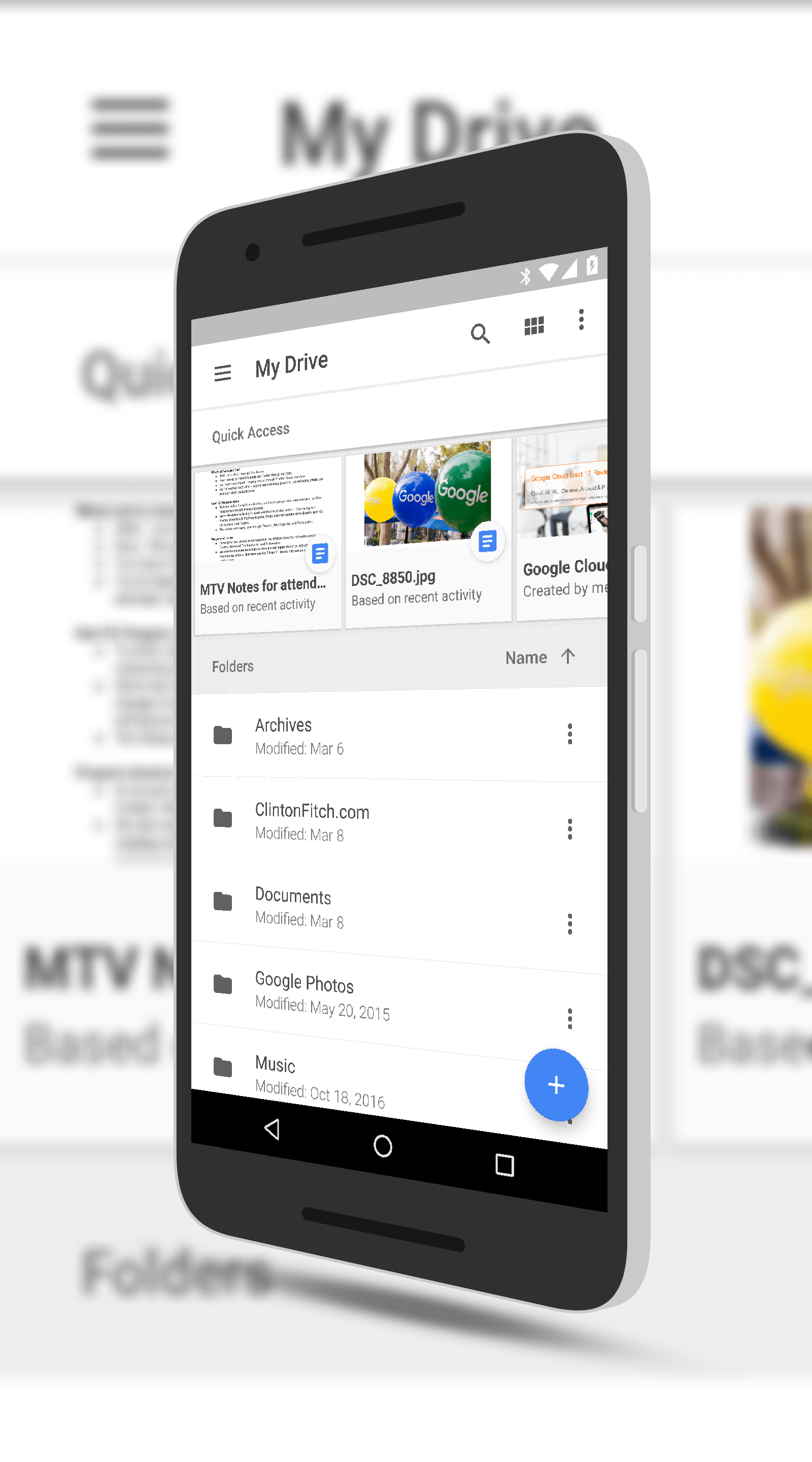
Google Drive Quick Access

Google Drive Quick Access

For Quick Access, however, we constructed thousands of simple features from the various signals above (for instance, the timestamps of the last 20 edit events on a document would constitute 20 simple input features), and combined them with the power of deep neural networks to learn from the aggregated activity of our users. By using deep neural networks we were able to develop accurate predictive models with simpler features and less feature engineering effort.

It is a pretty impressive model and frankly, it works just as impressively.  Looking at a meeting I had on my calendar, it bubbled up a Docs file that I had been using for notes around this particular meeting.  I didn’t have to search for it.  As you use Drive and other Google apps like G Suite (which includes the likes of Gmail, Calendar and of course Docs, Sheets and Slides), it will learn you better to give you more personalized results.

For Quick Access to work in Google Drive, you need to have the latest version of the app on your phone or tablet.  The feature should be enabled by default but if not, you can go into Setting to enable it (or disable it). You can read more about it on the Google Research Blog.

Android Nougat Coming to Chrome OS 58 or 59

While the ability to run Android apps on Chrome OS continues to roll out, the question for many is when or if it will be updated.  The answer is yes and pretty soon.  This week while attending Google Cloud Next in San Francisco, I posed the question to Chrome OS product management in a breakout session and it was confirmed that Android Nougat will be coming to the platform build 58 or 59.  Given that it is already in the beta channel, I suspect that it is likely 58.

As readers may know, Android Framework in Chrome OS currently is based on Android Marshmallow.  So, in theory, if an app will run in Marshmallow, it will run on Chrome.  The tricky bit has been that some apps can’t go full screen in 6.0 and features like multi-window support for apps is not something that is supported at all in Marshmallow.  All of that changes under 7.0 obviously as the framework allows for it.

Google Play Music Releases Their First Podcast, City Soundtracks

Google Play Music has released their first podcast produced by Google, City Soundtracks.  The 15-odd minute casts are aimed at highlighting an artist and the city from which they originate.  While Play Music has had the ability to listen to podcasts for a while now, this is the company’s first foray into actually producing one.  And I have to say, it’s pretty good.  Right now the cast list is only three episodes, all released yesterday, featuring artists from Austin, New Orleans and Oakland.  You can check it out here.

The official description pretty much tells you everything you need to know.

City Soundtracks by Google Play Music is a traveling conversation about the people, places and moments that shape our musical lives. Each episode features an artist and a city. Host Hrishikesh Hirway invites musicians to lead listeners on a tour of the city through conversation and music.

I’ve listened to two of the three episodes and I have to say, it’s not bad.

Add-Ons Coming to GMail for Additional Productivity

Productivity enhancing add-ons are going to be coming to Gmail later this year.  At Google Cloud Next today, the company announced that developers will soon be able to create add-ons that allow users to immediately jump to another app from within Gmail to complete a task or perform another task.  The idea is to increase productivity as you can stay within one app, Gmail, yet complete other tasks from another app.

The example used was from Intuit where someone could send an invoice to a customer right from within Gmail.  Using Machine Learning to figure out that the email was about a bill, users will be able with a tap to move into Quickbooks to create and send the invoice without ever having to leave the mail app itself.  Salesforce would be another example as you could add a contact to your contacts list within SalesForce right from Gmail.

Google Announces Jamboard for Collaboration That Takes on Surface Hub

Google is taking on the conference room and collaboration in a big, bold new way.  I’ve already told you about Hangout Meet but add to that Google Jamboard.  Jamboard is aimed at being a whiteboard with collaboration across multiple sites with deep integration into G Suite for file collaboration and sharing.  The 55″ 4K monitor comes with a stylus for interactions (it’s passive so no pairing required) and can even distinguish between the stylus and your finger.  Think of drawing with the stylus and erasing with a finger.

Google states it is a merge of digital and physical creativity and having seen a demo and using it at Google Cloud Next today, it is mighty impressive.

%d bloggers like this: