Extras+Info for Lumia Phones Updated – With What I Have No Clue

Before I started writing this post I seriously debated whether to bother with it. But I like to think that I keep everyone reasonably up-to-date with app changes – especially those involving settings on Windows Phones – so thus you have a post.  Microsoft today update the Extras+Info app in Settings for Lumia devices.  The new build, version 3.14.6.2 for those keeping score at home, is available now in the Windows Phone Store.

I have absolutely no idea what changed.

Extras+Info for Lumia Devices – Free – Download Now

Fitbit for Windows Phone Gets Surge Centric Updates

Fitbit has released another update to the Fitbit for Windows Phone app, the 4th month in a row that the app has been updated.  The update, version 1.6.206.12403 for those keeping score at home, is mainly focused on improvements for the new Fitbit Charge HR and Surge trackers but there also other changes that all users of the app will appreciate.  Perhaps the most important of those general updates is the shrinking of the app down from 26MB in size to 18MB.  That may not sound like much but it adds up if you have a limited amount of phone storage left on your Windows Phone.

Fitbit for Windows Phone – Free – Download Now

FB Pages Manager for Windows Phone Updated to 2.0

If you have your own Facebook pages or manage one for your company, the app you need to manage them has just been updated.  FB Pages Manager for Windows Phone has been updated with several new features to bring it up-to-date with the web based pages manager from Facebook themselves.  The new update, version 2.0 for those keeping score at home, brings new enhancements such as being able to see scheduled posts and Events all from your device without having to go to the Facebook Pages website itself (which can be clunky on a Windows Phone).  The update impacts both the free version of the app as well as the Pro version.  The difference between free and Pro is the adverts within the app, Insights to see how your page is doing and the photo management.  The app is also as close a universal app as we have in Windows these days so when you buy the Pro version you also have access to the Windows 8.1 version of the app for free (or vise versa).

FB Pages Manager Lite – Free (ad-supported) – Download Now

FB Pages Manager Pro – $1.99 (Universal App) – Download Now

FB Pages Manager Pro for Windows 8.1 – $1.99 (Universal App) – Download Now

Podcast+ Pro for Windows Phone Sees A Major Update

One of the best podcast apps available for Windows Phone, Podcast+ Pro, has received a significant update overnight bringing several new features and a wide range of fixes & improvements along the way.  Podcast+ Pro is my favorite podcast app available for the platform and if you are one who listens to a lot of podcasts it should be on your short list to consider.  The update, version 4.3.0.0 for those keeping score at home, adds a handful of new features including the ability to automatically mark your podcasts as played but also adds a lot of fixes and improvements to enhance the overall user experience with the app.

Podcast+ Pro for Windows Phone – $2.99 – Download Now

A Closer Look At The Action Center in Windows 10 for Phone

As I put in my initial thoughts post last week, there are a lot of changes coming in Windows 10 for Phone aimed at brining the Little OS That Could to par with Android and iOS.  While the final verdict of if that was achieved will come out in the months ahead, there are clear indicators already in the Preview that point to Microsoft taking a big step forward in making the user experience in

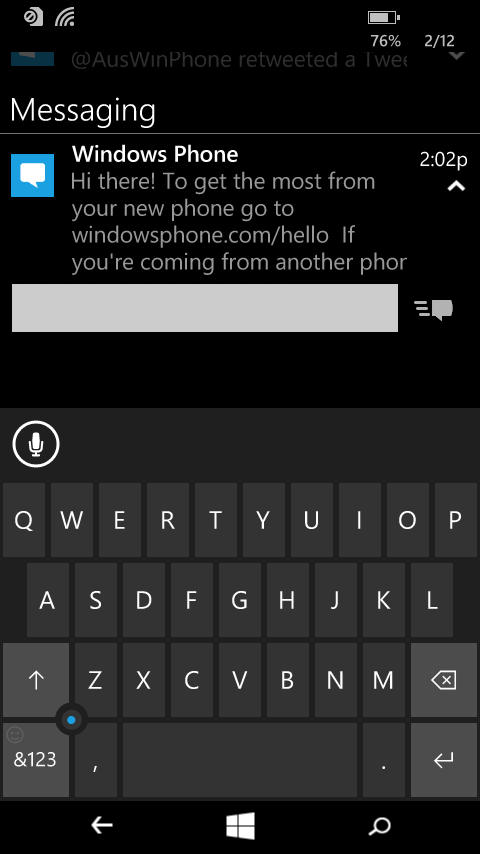
Replying to SMS in Action Center in Windows 10 for Phones

Replying to SMS in Action Center in Windows 10 for Phones

this release far more friendly and customizable.  One of those areas is the Action Center.

Action Center itself in Windows Phone is not new.  It’s been there since Windows Phone 8.0 but it has been fairly limited in what it could do.  Basically it was read only information on notifications.

Now however in Windows 10 for Phone, it becomes far more interactive and, dare I say, useful.  Now you will be able to interact with things like SMS messages or delete individual notifications for other apps and by the time Windows 10 for Phone is released, be able to interact with other Microsoft services like Skype.  The key is you can do all of this without leaving the app you are in at the time on your phone.

%d bloggers like this: