Author: Clinton

Pocket Casts Gets A Major Update

The outstanding (and my clear favorite) podcast app, Pocket Casts, has a major update rolling out in the Play Store today.  The update, version 6.0 for those keeping score at home, brings support for key Android Nougat features as well as the ability to share your list of podcasts with others.  As for the Nougat features, multi-window support is now in the app.  Now you can view a video podcast on 1/2 of your device screen while working on something else in the other half.  This is particularly handy if you are viewing an educational podcast and want to jot notes down in Keep for example.
Google Calendar Adds Month View Widget

Google Calendar for Android has an update rolling out that brings mostly one new but desired feature by users:  A monthly calendar view widget.  The updated version of the app, version 5.6.2 for those keeping score at home, allows you to add a widget that can be resized to show an entire month of your calendar without having to open the app itself.  This is a feature that many other calendar apps have already so it is very much a catch up feature.  Previously you only had one widget which provided you the schedule view.  It too was resizable but it would just stretch out the items on your schedule.  Not super useful if you need to see what you have going on a few weeks from now.

Alphabet Posts $5.1b Profit, Mostly Thanks to Google

The parent company of Google, Alphabet, has released their 3rd Quarter earnings report and it is all about Google.  The company made some $5.1 billion in profits for the quarter that ended in September with the vast majority of those dollars coming from the flagship brand of the company.  Google itself brought in $22.2 billion and made an operating profit of $6.7 billion.  That was countered with the other divisions of the company losing $865 million.

Google Drive Drops Support for Windows XP and Vista

While it shouldn’t come as a shock to most, it is official.  Starting January 1, 2017, Google Drive for desktop will no longer support Windows XP, Windows Vista and Windows Server 2003.  Given that Microsoft themselves no longer support these older versions of Windows themselves, it only makes sense that Google and other stop supporting it too.  The announcement came via the Google G Suite blog and was very clear that while the app is no longer supported, it should still work.  There won’t be any support or any further updates to the builds of Google Drive for these platforms.

Google Allo Update Brings Direct Reply Support

Google Allo has not had the best reception since its release last month but it is clear that Google intends on driving it and their new video app, Google Duo, as their primary messaging apps.  Allo, for its part, is getting a healthy update today that brings a couple of feature many users requested on the initial release.  First is Direct Reply.  This feature allows you to reply to a message right from the notification shade – like you can with, oh, just about every other messaging app from Google and others.  While you have had quick responses available in the Notification Shade, being able to reply with your own text, to now, hasn’t been an option.  This is certainly a must have feature for a messaging app these days and it is good that Allo has it on board.

Chrome OS Build 54 Released With Many Improvements

The Chrome team has dropped Build 54 of Chrome OS today, bringing with it several improvements and enhancements to the Operating System.  The new build is 54.0.2840.79 (Platform version: 8743.76.0) and available to the majority of devices out in the market.  The only devices it is not available for currently are the HP Chromebook 13 G1, Acer Chromebook 14 for Work and Thinkpad 13 Chromebook.  If you have one of these devices, you’ll have to wait until the update is made available later.

This update brings a lot of new features and improvements, particularly around UI elements.  The highligh of this is the new Alt-Tab feature which improves switching between windows.

Today’s Deal: iClever USB-C Multi-Port Adapter

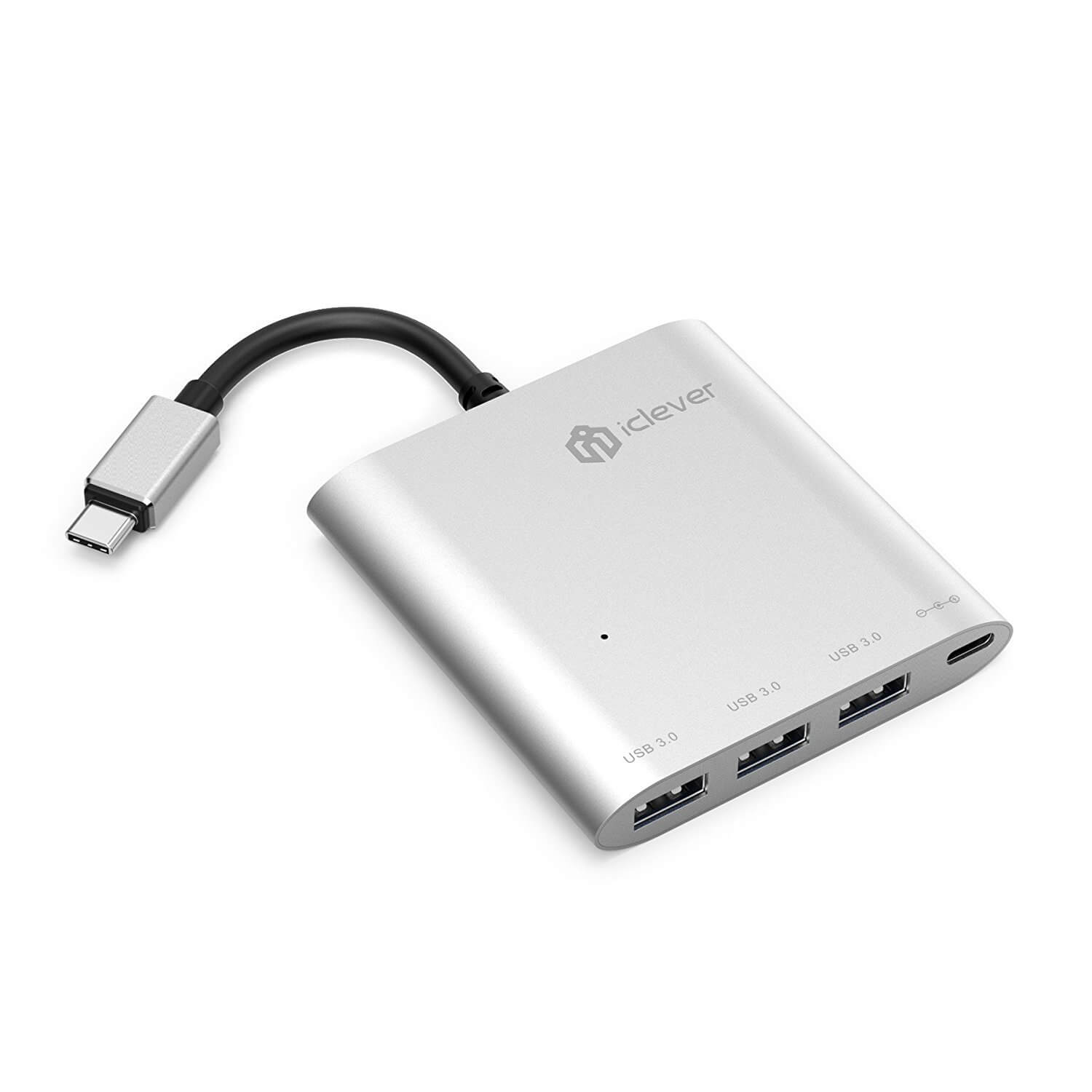
Today’s Deal is from iClever and it is on the handy multi-port USB-C adapter.  Right now you can pick it up for $12.99 if you use the coupon code 83NS2PT5 when you check out.  Normally it is $19.99 for the adapter.  It connects to a USB-C port on your Chromebook or Macbook and gives you three additional ports:  1 USB-C and 3 USB-A 3.0 ports.  That means that you will get iClever Multi-Port Adapterabout 5GB/sec throughput with this adapter and it gives you the extra ports you need.

The multi-port adapter is made to last with an aluminum casing and durable, hardened cable to connect it to your computer with a USB-C port.  That said, it is still backed by a lifetime guarantee and since the deal is through Amazon, you have a 30 day return policy if it doesn’t meet your needs.

To get this special pricing, you must use the coupon code above.  This will be entered when you star the checkout process on Amazon.  For those of you who have Amazon Prime, you will get free shipping on Today’s Deal on top of the coupon discount.

To check out the full details on the adapter, head over to Amazon.

Special thanks to the team over at iClever for the coupon code for ClintonFitch.com readers!


Google Docs Update Brings Assignable Actions to Contributors

An update is currently rolling out to the Google Play Store for Google Docs and Google Sheets that further both apps features around collaboration.  Both apps now allow you to create and assign action items to collaborators on a document or file.  For example, if you want to have a team member work on a specific paragraph or the financial figures in a particular part of the document or sheet, you can assign it to them and get notified when that task is completed.  It is a great way for teams to work together on a file and to make sure specific edits are completed.

%d bloggers like this: