Nokia Camera App Now Lumia Camera App for Windows Phone

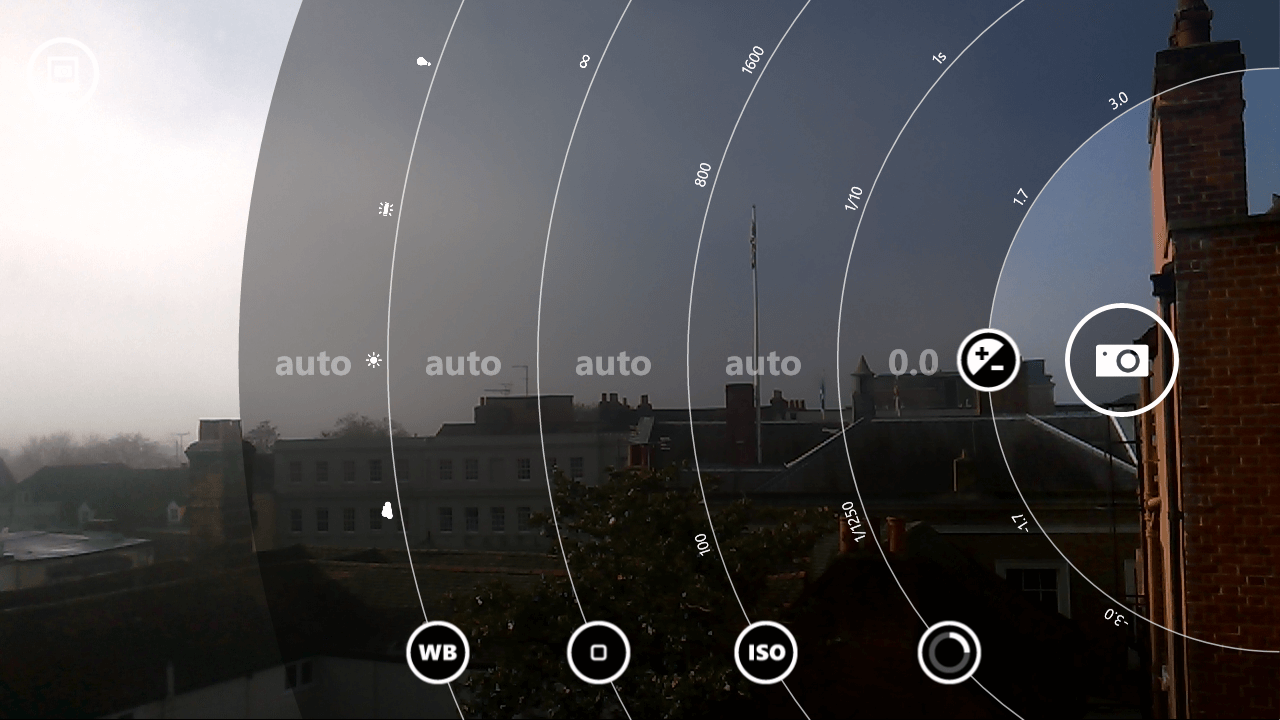
After disappearing over the weekend, the Nokia Camera app has returned to the Windows Phone Store under its new name.  The Lumia Camera app for Windows Phone sports no new features (only bug fixes) but brings to a close one more app that was using the Nokia name in the store.  Microsoft has been on a long process of renaming all of the “Nokia” apps to “Lumia” and the Nokia Camera app was one of the last remaining.

The update should have hit your Windows Phone already if you have the Nokia Camera app installed.  If not you can go to the Store
Lumia Camera for Windows Phone

Lumia Camera for Windows Phone

app on your Windows Phone then go to the More menu, Settings and then tap the “Check for Updates” button.

I’m personally a big fan of the Lumia Camera app as it gives you much more control of your photography than the built-in Windows Phone Camera app.  I also find the Burst mode of the app to be great for capturing action shots or as I did this weekend, fireworks!

The Lumia Camera app is free and available now in the Windows Phone Store

Lumia Camera for Windows Phone – Free – Download Now 

AT&T Windows Phone Options Doubles This Week

The AT&T Windows Phone options for customers and those looking to move to the carrier will take a nice step forward this week.  Yesterday the carrier announced that the Microsoft Lumia 830 and HTC One M8 Windows Phone will both be making their debut on the their network on Friday, November 7th.  Customers will have the choice of no less than four Windows Phone devices with AT&T, with the Lumia 635 and Lumia 1520 to the lineup.

How To Move Your OneDrive Folder to an External Disk

OneDrive has been in the news a lot this past week with the expansion to unlimited storage in the service for those who subscribe to Office 365.  That expansion has already started with many users, including me, seeing totals of 10TB of storage available to them now.  With that added storage space, now the question is how to get as much of your content into OneDrive as possible for safe keeping and for easy access, especially photos and videos.

One challenge users may encounter however is limited disk space on their PC when it comes to moving all of that data.  Let me give you an example.  I run Windows 8.1 Pro on my MacBook Pro (non-Bootcamp, straight up Windows baby) and I have a 256GB SSD hard disk in it.  My photos and videos top out at 286GB which, simple math says, is bigger than 256GB.  That means if I wanted to copy photos over I would have to do one of two things:  Drag-and-drop folders of pictures onto my hard disk, wait for them to sync, then designate them as offline only.  It works but it is clunky.  Or two, move my OneDrive folder to an external disk.  Fortunately this is pretty easy to do in Windows.

What is Your Windows Phone App Gap?

It is a rainy Sunday morning here in London today.  Well, to be fair, it’s pretty much raining everywhere in England today.  So as I sat in my office, catching up on news and other bits-and-bobs, I read an article over at Computing UK where Microsoft’s Joe Belfiore outlines how developers are coming to Windows Phone in larger numbers as the platform starts to gain momentum.  In it he states:

“If you’re a super high-end early adopter of apps, it’s probably not the best platform choice for you, but if you’re not … we see tons of people who are highly satisfied with it.

“As Windows 8.1 in general increases its volume, we see more and more software developers getting engaged on that platform, and that addresses the app gap,” he added.

That’s a pretty powerful statement.  It is a bit of an admission but also a bit of forward thought on how Windows Phone apps are gaining momentum as the platform itself gains momentum.

After reading the article, it got me thinking about my own change from iOS to Windows Phone.  What apps am I missing in my day-to-day life?  I somewhat expected myself to come up with a laundry list.  That was, after all, why I left Windows Phone three years ago.  The app gap was more like an app canyon at that point.  The result was surprising.  I ended up with only two apps out of my daily life that I really do miss from my iOS days.  The number of apps I have installed on my Windows Phone?  61.

Effectively I proved in my own world-centered-on-Clinton that the Windows Phone app gap is shrinking.  Fast.

Is Microsoft Band the Device AppleWatch Should Fear?

Microsoft has had a huge couple of weeks.  The updates have been broad, impacting a whole lineup of products and solutions from the company.  One of those announcements was Microsoft Band, the lifestyle and fitness wearable that has a huge number of sensors and Cortana.  The device went on sale yesterday and it has pretty much sold out of your local Microsoft store and for sure online.

The Microsoft Band, while innovative in design, fundamentally isn’t bringing anything terribly new to the wearable market, especially the fitness market.  Fitbit has somewhat been the standard when it comes to fitness wearables but Jawbone’s Up has also been there as has Nike’s Fuel Band.  But really, when you do a stare-and-compare, you think Fitbit.

When it comes to Smartwatches however, the game is pretty much wide open.  Apple is introduced the AppleWatch two months ago and it was immediately compared to the Fitbit line up and every Smartwatch that any Android based manufacture had ever produced.  What you get past the distortion field however and really look at the AppleWatch, it has some serious flaws.  Like deal breaker flaws.  I’m going to look at three of them:  Cross-platform support, price of entry and ease-of use.

What I’m not going to do is compare the Microsoft Band to anything from Fitbit.  Frankly, there are a lot of people who only want a step tracker or calorie tracker.  They produce some fantastic solutions that, while certainly more limited when compared to the Band, do a great job.  I’m on my 2nd Fitbit in 5 years (they take a beating and keep on keeping on) and it is the only wearable I’ve ever used or considered until the Band was released a couple of days ago.  I think the only way you can do a proper comparison of a Fitbit product to the Band is if you compare the upcoming Surge.  But if you need integration to your Windows Phone and other apps, I think the Microsoft Band will be better.

%d bloggers like this: