Category: Android

Google Posts Android Marshmallow February Security Update

As expect and right on time, Google has posted the February security update for Android Marshmallow today.  The update takes the 6.0.1 build to version MMB29Q and it is now available for flashing on the Factory Images page of the developer site.

There are a lot of security fixes in this update, the biggest of which is a fix for remote code execution which was discovered in January.

The most severe of these issues is a Critical security vulnerability that could enable remote code execution on an affected device through multiple methods such as email, web browsing, and MMS when processing media files. The Remote Code Execution Vulnerability in Broadcom’s Wi-Fi driver is also Critical severity as it could allow remote code execution on an affected device while connected to the same network as the attacker.

Google points out in the security bulletin that they are not aware of any customers being impacted by this issue but is encouraging users to update as soon as the build is available to them.
NVIDIA Shield Tablet Gets Marshmallow

NVIDIA has released the promised and much anticipated Android Marshmallow update to the Shield Tablet.  The update was released this morning and referred to as Software Update 4.0 on the NVIDIA support site.

Along with all of the goodies that come with Android Marshmallow, the company has also added or improved several aspects of the tablet.  The first thing users will notice is the updated User Interface.  It has a far more Material Design look to it than in previous releases.

Samsung Galaxy S6, S6 Edge Get Marshmallow Update – In Korea

After months of delays and after many other manufactures have rolled out Android Marshmallow 6.0.1 to their devices, Samsung has finally started releasing it for the Galaxy S6 and Galaxy S6 Edge… if you live in South Korea.

The news of the release came out late on Friday of last week and while there is no indication of when it will hit the rest of the world, it hopefully won’t be long.  The UK will likely see the update first given that country was part of the beta program for the release.

Weather Channel App Improves Local Ski Information

The Weather Channel has updated their app for Android phones today, bringing with it a much improved ski resort and ski area report to the app.  The updated build is version is 6.2 for those keeping score at home and this improved ski information is only on the phone app.  The tablet version was also updated (5.2) but it doesn’t contain the ski information.

As before, when you scroll down to the bottom of the app on your phone, you will see ski information for your area.  Now you have the option to tap the All Resorts link and you will get a list of resorts in the area you are viewing (in my case Denver).

Weather Channel – Free – Download Now

Google Calendar Adds Smart Suggestions and 30 Languages

Google Calendar for Android has received a nice update that brings a new smart suggestions feature that makes creating new events quicker and easier than ever.  The update is rolling out to the Google Play Store now and is version 5.3.3 for those keeping score at home.

The new smart suggestions make creating a new calendar event quickly by giving you suggestions based on what you are typing.  So for example, if you start typing “din” it will come up with the suggestion “Dinner” or “Dinner with mom” and then you can tap on that to add it to the event name.  But it goes further.  You can add the location when you see the “at” option appear and you can add people when you see the “With”.  While it is only supported in English currently, you can also use the “on” feature to add a date and time to the event.  All of this is done with literally a few taps instead of having to type every. single. word.

Google Calendar for Android – Free – Download Now

OnePlus Announces The OnePlus X is Invite Free

If you have been waiting for an invite to purchase the OnePlus X, your wait is over.  Actually, it is over for everyone.  In a post on the company’s forums, OnePlus co-founder Carl Pei announced that the mid-range phone has gone invite free for good, joining the ranks of their flagship device the OnePlus 2, and doing so in record time.

We’re extremely excited to be making the OnePlus X invite-free more quickly this time around. With every device we release, we grow more mature and more adept at handling the demands and expectations of our community. We largely owe our success to your unrelenting support, so we hope that this development will make the process of purchasing your very own OnePlus X as smooth and effortless as it can possibly be.

The news is certainly welcome and eliminates one of the biggest complaints about buying a OnePlus product.  As I put in post on why the OnePlus 2 had to be a success back in June 2015, the invite system had to be improved over the OnePlus One in 2014. It was but it was still not a great experience and that experience was mirrored with the OnePlus X.  It’s understandable to an extent.  The company is working off really thin margins and any over production of devices could have serious ramifications for the company.  But it appears they have got their hands on how to deal with demands and production which means consumers benefit from just simply being able to buy the device on demand.

Google Ending My Tracks Support in April 2016

While the news shouldn’t come as a huge surprise to many, Google announced that as of April 30th of this year, their exercise mapping app My Tracks will no longer be available.  The app, which allowed you to track your run, walk or biking activities and display them in Google Maps, never really caught the imagination of users and faced stiff competition for other apps that provided more detailed information on users activities.

After April 30, 2016, My Tracks will no longer be available. We apologize for the inconvenience this might cause My Tracks users. We’ve made the tough decision to invest our efforts into other, more wide-reaching, mapping projects. Below are some resources to help you manage or export your data and find other apps to continue tracking your activities.

If you are a heavy user of My Tracks, Google has provided a way to export your data and save it which is outlined in the announcement.

Google Docs, Sheets and Slides Get Improved Collaboration

Google continues to develop their suite of Office-like apps, Google Docs, Google Sheets and Google Slides, and the latest update to the web, Android and iOS versions of the app are all aimed at improving collaboration on files.  The updates are rolling out now to the various platforms and for your Android or iOS device, it may be several days before you see the new builds of the apps hit your phone or tablet.

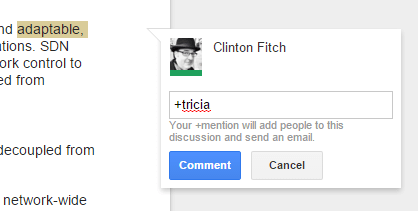
Before I get to the changes that Google announced on the Android apps, let’s first talk about the changes to the web version of Google Docs.  Now you can instantly add a comment when you

Google Docs for Web Comments

Google Docs for Web Comments

highlight a piece of text.  When you highlight that text, on the right you will now see a comment bubble pop up.  Click on it and add your comments about that portion of the text.  Want to add someone to collaborate on the document, just start typing in their name and it will popular their email address in the comments and will send them an email notifying them.  They can then add comments to the document too, bringing teams together in a more efficient way as everyone is working from the same, literal, page.

Now let’s turn to Android.

%d bloggers like this: